
学生インターンシップです!
スパイラル株式会社の学生インターンとして、SPIRALを学習しながらユーザー目線で質問に答える活動をしています。
補足情報や調査結果を提供を行い、皆様のお役立てができればと思っています!
※学生による調査・補足情報です、参考としてご利用ください。
正式な仕様や最終的な内容は保証されません。
皆様は顧客リストや店舗リストを見ているとき、「ここの場所、地図で見たいな」と思うことはありませんか?
いちいち住所を検索するのは面倒・・・そこで今回は、SPIRALの一覧表を少し編集するだけで、
誰でも簡単に「 Googleマップボタン」を実装する方法をご紹介します。
作るもの
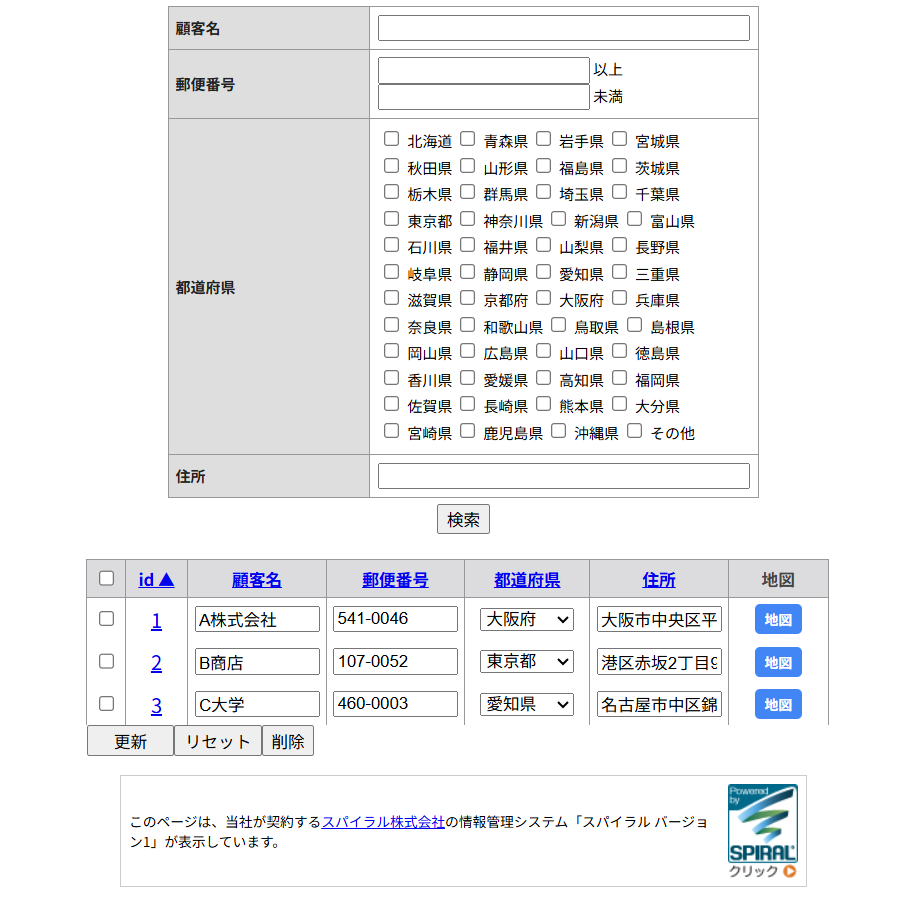
SPIRALのDBに登録された顧客リストを一覧表で表示し、
同時に 「クリックすると、その住所のGoogleマップが別タブで開くボタン」 を設置します。
Google Maps Platform(API)を利用せず、
URLリンクのみで実装できるためAPIキーの発行や契約を行う必要はありません。
同時に 「クリックすると、その住所のGoogleマップが別タブで開くボタン」 を設置します。
Google Maps Platform(API)を利用せず、
URLリンクのみで実装できるためAPIキーの発行や契約を行う必要はありません。
構築方法
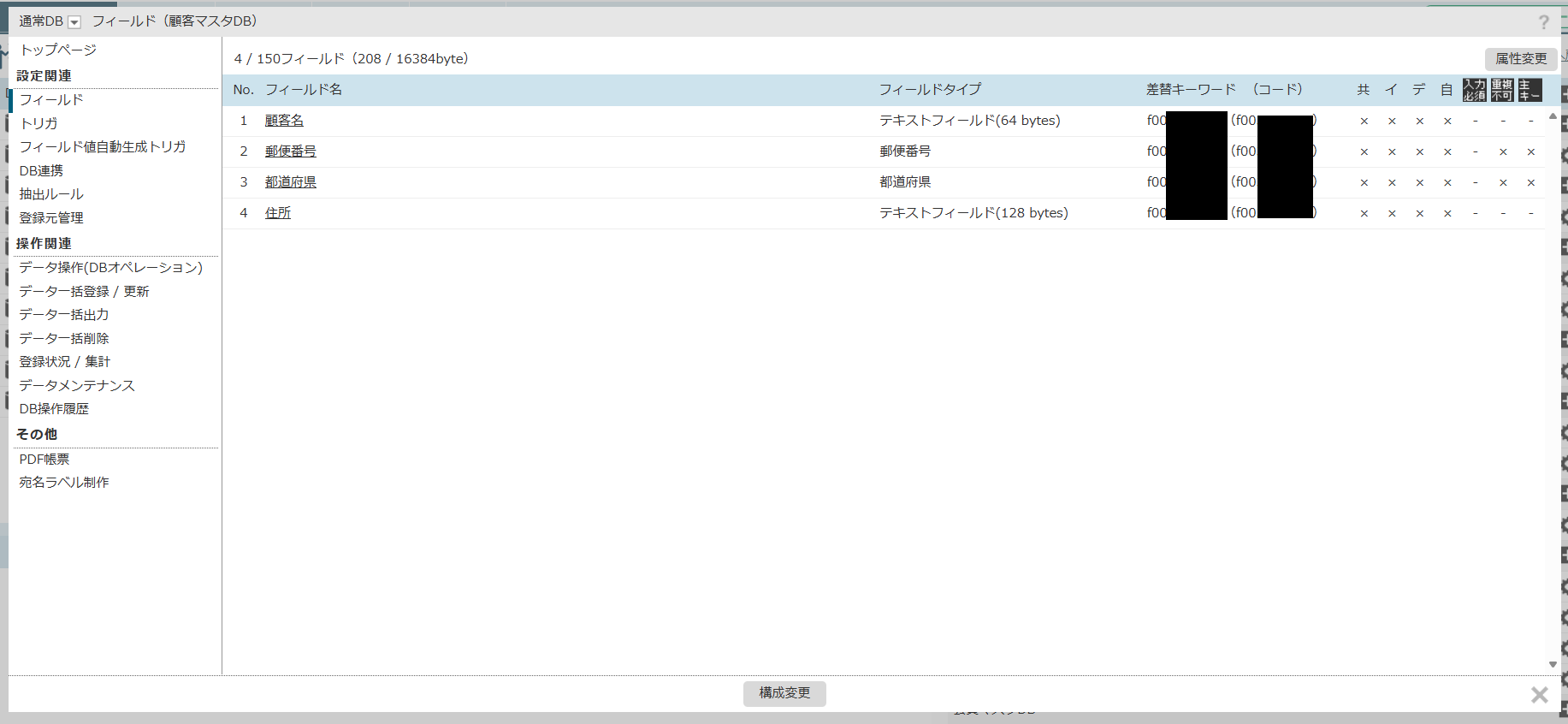
まずはSPIRAL上でDBを作成します。
今回は簡単に顧客の名前と住所を格納するだけの「顧客マスタDB」を作成します。
今回は簡単に顧客の名前と住所を格納するだけの「顧客マスタDB」を作成します。
次に、作成したDBに紐づいた一覧表を作成します。
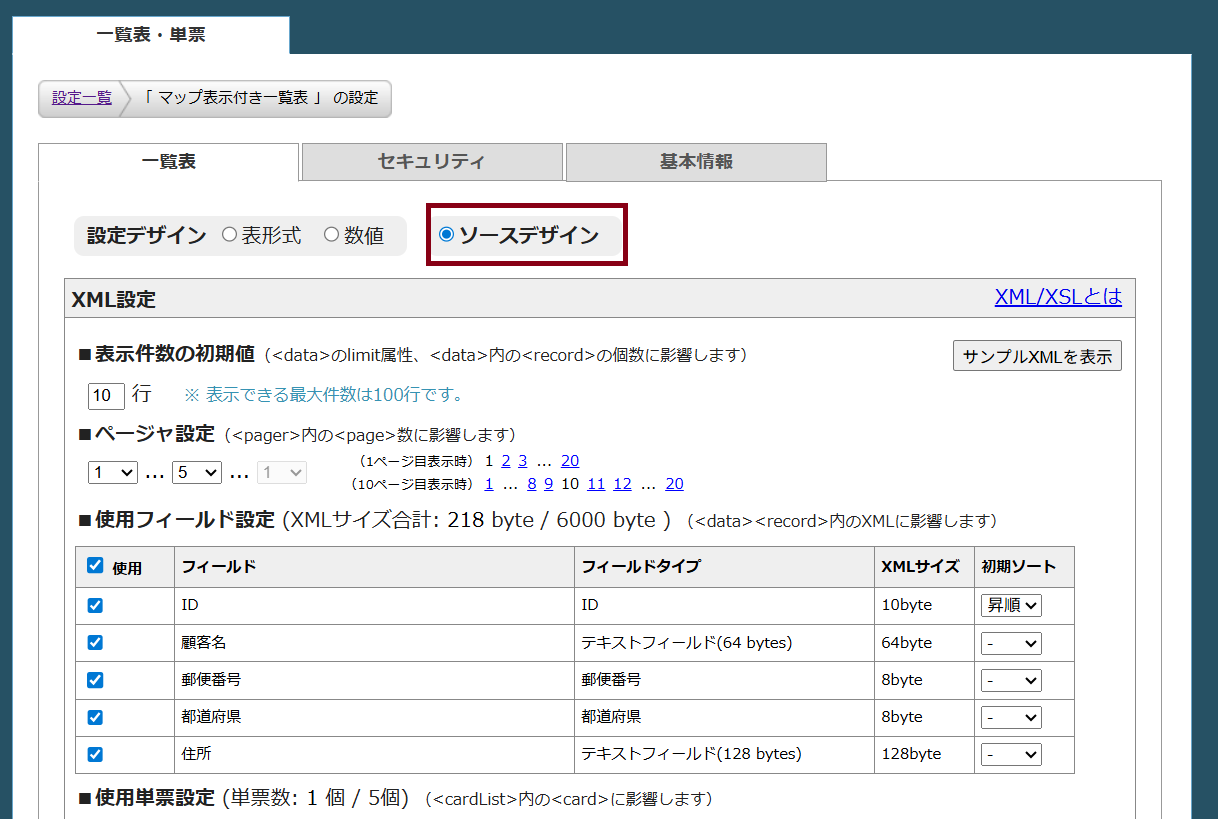
設定を開き、「一覧表」タブで「ソースデザイン」を選択します。
設定を開き、「一覧表」タブで「ソースデザイン」を選択します。
Googleマップには、URLの末尾に検索したい住所をつけるだけで、その場所を表示してくれる便利な機能があります。
この機能を使って、SPIRAL上に保存されている住所を当て込む処理を実装します。
XLS設定のソースコードを以下のコードに変更してください。
※f00から始まる差し替えキーワードに関しては、ご自身の設定したDBに合わせて変更してください。
この機能を使って、SPIRAL上に保存されている住所を当て込む処理を実装します。
XLS設定のソースコードを以下のコードに変更してください。
※f00から始まる差し替えキーワードに関しては、ご自身の設定したDBに合わせて変更してください。
<?xml version="1.0" encoding="EUC-JP"?>
<xsl:stylesheet version="1.0" xmlns:xsl="http://www.w3.org/1999/XSL/Transform">
<xsl:output method="html" />

<xsl:template match="/">
  <xsl:apply-templates select="table" />
</xsl:template>

<xsl:template name="sortText">
  <xsl:param name="field" />
  <xsl:variable name="appendSort" select="/table/data/@sort" />
  <xsl:choose>
    <xsl:when test="$appendSort = concat($field, '_down')"><xsl:text> ▼</xsl:text></xsl:when>
    <xsl:when test="$appendSort = concat($field, '_up')"><xsl:text> ▲</xsl:text></xsl:when>
  </xsl:choose>
</xsl:template>

<xsl:template name="limiter">
  <xsl:param name="limit" />
    <select name="_limit_{/table/@tableId}">
      <option value="10"><xsl:if test="$limit = '10'"><xsl:attribute name="selected">selected</xsl:attribute></xsl:if>10件</option>
      <option value="50"><xsl:if test="$limit = '50'"><xsl:attribute name="selected">selected</xsl:attribute></xsl:if>50件</option>
      <option value="100"><xsl:if test="$limit = '100'"><xsl:attribute name="selected">selected</xsl:attribute></xsl:if>100件</option>
    </select>
  <input type="submit" name="smp-table-submit-button" value="表示" />
</xsl:template>

<xsl:template match="pager">
  <table class="smp-pager">
    <tr>
      <xsl:for-each select="page">
        <td>
          <xsl:choose>
            <xsl:when test="@current = 'true'">
              <xsl:attribute name="class">smp-page smp-current-page</xsl:attribute>
              <xsl:value-of select="." />
            </xsl:when>
            <xsl:when test="@omit = 'true'">
              <xsl:attribute name="class">smp-page smp-page-space</xsl:attribute>
              <xsl:value-of select="." />
            </xsl:when>
            <xsl:otherwise>
              <xsl:attribute name="class">smp-page</xsl:attribute>
              <a href="{@url}"><xsl:value-of select="." /></a>
            </xsl:otherwise>
          </xsl:choose>
        </td>
      </xsl:for-each>
    </tr>
  </table>
</xsl:template>

<xsl:template match="/table">
  <script type="text/javascript" src="{@jsPath}" charset="{@jsEncode}"></script>
  <style>
  .map-btn {
      display: inline-block;
      background-color: #4285F4;
      color: #FFFFFF !important;
      padding: 4px 8px;
      text-decoration: none;
      border-radius: 4px;
      font-size: 11px;
      font-weight: bold;
      white-space: nowrap;
  }
  .map-btn:hover {
      background-color: #357ae8;
      opacity: 0.9;
  }
  </style>
  <form method="post" action="{@action}">
    $hidden:table:extension$
    <table id="smp-table-{@tableId}" class="smp-table" cellspacing="0" cellpadding="0" style="border-collapse:collapse;">
      <col class="smp-col-1" width="30" />
      <col class="smp-col-2" width="50" />
      <col class="smp-col-3" width="100" />
      <col class="smp-col-4" width="100" />
      <col class="smp-col-5" width="100" />
      <col class="smp-col-6" width="100" />
      <col class="smp-col-map" width="80" /> <col class="smp-col-7" width="10" />

      <tr class="smp-row-4 smp-row-sort" style="height:20;">
        <td class="smp-cell-sort smp-cell-4-1" style="border:1px solid #999999; padding:5px; background-color:#DCDCDE;" align="center">
          <input type="checkbox" onclick="SpiralTable.allCheck({/table/@tableId}, this)" onkeydown="return SpiralTable.keyCheck(event);" />
        </td>
        <td class="smp-cell-sort smp-cell-4-2" style="border:1px solid #999999; padding:5px; font-size:10pt; font-weight:bold; color:#444444; background-color:#DCDCDE;" align="center">
          <a href="{/table/fieldList/@idSort}">id<xsl:call-template name="sortText"><xsl:with-param name="field" select="'id'" /></xsl:call-template></a>
        </td>
        <td class="smp-cell-sort smp-cell-4-3" style="border:1px solid #999999; padding:5px; font-size:10pt; font-weight:bold; color:#444444; background-color:#DCDCDE;" align="center">
          <a href="{/table/fieldList/field[@title='f00xxxxx']/@sort}">顧客名<xsl:call-template name="sortText"><xsl:with-param name="field" select="'f00xxxxx'" /></xsl:call-template></a>
        </td>
        <td class="smp-cell-sort smp-cell-4-4" style="border:1px solid #999999; padding:5px; font-size:10pt; font-weight:bold; color:#444444; background-color:#DCDCDE;" align="center">
          <a href="{/table/fieldList/field[@title='f00xxxxx']/@sort}">郵便番号<xsl:call-template name="sortText"><xsl:with-param name="field" select="'f00xxxxx'" /></xsl:call-template></a>
        </td>
        <td class="smp-cell-sort smp-cell-4-5" style="border:1px solid #999999; padding:5px; font-size:10pt; font-weight:bold; color:#444444; background-color:#DCDCDE;" align="center">
          <a href="{/table/fieldList/field[@title='f00xxxxx']/@sort}">都道府県<xsl:call-template name="sortText"><xsl:with-param name="field" select="'f00xxxxx'" /></xsl:call-template></a>
        </td>
        <td class="smp-cell-sort smp-cell-4-6" style="border:1px solid #999999; padding:5px; font-size:10pt; font-weight:bold; color:#444444; background-color:#DCDCDE;" align="center">
          <a href="{/table/fieldList/field[@title='f00xxxxx']/@sort}">住所<xsl:call-template name="sortText"><xsl:with-param name="field" select="'f00xxxxx'" /></xsl:call-template></a>
        </td>
        <td class="smp-cell-sort smp-cell-4-map" style="border:1px solid #999999; padding:5px; font-size:10pt; font-weight:bold; color:#444444; background-color:#DCDCDE;" align="center">
          地図
        </td>
        <td class="smp-cell-sort smp-cell-4-7" style="border-left:1px solid #999999;"></td>
      </tr>

      <xsl:for-each select="data/record">
        <xsl:variable name="row" select="position() + 4" />
        <xsl:variable name="id" select="@id" />

        <tr style="height:20;">
          <xsl:attribute name="class">
            <xsl:text>smp-row-</xsl:text><xsl:value-of select="$row" /><xsl:text> smp-row-data</xsl:text>
            <xsl:if test="string(./*/@hasError) = 'true'"><xsl:text> smp-valid-err-row</xsl:text></xsl:if>
          </xsl:attribute>

          <td align="center" style="border-width:0px 1px; border-style:solid; border-color:#999999; padding:5px;">
             <input type="checkbox" name="smp-table-check-{/table/@tableId}" value="{@id}" onclick="SpiralTable.targetCheck({/table/@tableId}, {@id}, this.checked)" />
          </td>

          <td align="center" style="border-width:0px 1px; border-style:solid; border-color:#999999; padding:5px;">
            <a href="{/table/cardList/card[@title='page_458323'][@recordId=$id]}" target="_self"><xsl:value-of select="@id" /></a>
          </td>

          <td align="center" style="border-width:0px 1px; border-style:solid; border-color:#999999; padding:5px;">
            <input type="text" name="smp-uf-{/table/fieldList/field[@title='f00xxxxx']/@code}-{@id}" value="{usr_f00xxxxx}" style="width:100px;" />
          </td>

          <td align="center" style="border-width:0px 1px; border-style:solid; border-color:#999999; padding:5px;">
            <input type="text" name="smp-uf-{/table/fieldList/field[@title='f00xxxxx']/@code}-{@id}" value="{usr_f00xxxxx}" style="width:100px;" />
          </td>

          <td align="center" style="border-width:0px 1px; border-style:solid; border-color:#999999; padding:5px;">
            <xsl:variable name="prefVal">
               <xsl:for-each select="/table/fieldList/field[@title='f00xxxxx']/label">
                  <xsl:if test="@value = usr_f00xxxxx/@selected"><xsl:value-of select="." /></xsl:if>
               </xsl:for-each>
            </xsl:variable>

            <select name="smp-uf-{/table/fieldList/field[@title='f00xxxxx']/@code}-{@id}">
               <xsl:variable name="selected" select="usr_f00xxxxx/@selected" />
               <xsl:for-each select="/table/fieldList/field[@title='f00xxxxx']/label">
                 <option value="{@value}"><xsl:if test="@value = $selected"><xsl:attribute name="selected">selected</xsl:attribute></xsl:if><xsl:value-of select="." /></option>
               </xsl:for-each>
            </select>
          </td>

          <td align="center" style="border-width:0px 1px; border-style:solid; border-color:#999999; padding:5px;">
            <input type="text" name="smp-uf-{/table/fieldList/field[@title='f00xxxxx']/@code}-{@id}" value="{usr_f00xxxxx}" style="width:100px;" />
          </td>

          <td align="center" style="border-width:0px 1px; border-style:solid; border-color:#999999; padding:5px;">
             <xsl:variable name="prefText">
               <xsl:variable name="currentVal" select="usr_f00xxxxx/@selected" />
               <xsl:for-each select="/table/fieldList/field[@title='f00xxxxx']/label">
                 <xsl:if test="@value = $currentVal"><xsl:value-of select="." /></xsl:if>
               </xsl:for-each>
             </xsl:variable>

             <a href="https://maps.google.com/maps?q={$prefText}{usr_f00xxxxx}" target="_blank" class="map-btn">
               地図
             </a>
          </td>

          <td style="border-left:1px solid #999999"></td>
        </tr>
      </xsl:for-each>

      <tr class="smp-row-17 smp-row-normal" style="height:20;">
        <td class="smp-cell-17-1" style="font-size:10pt;" align="left" colspan="7"> <input id="smp-table-update-button" class="smp-table-button" type="submit" name="smp-table-submit-button" value="更新" onclick="return SpiralTable.confirmation({/table/@tableId}, this);" />
          <input id="smp-table-reset-button" class="smp-table-button" type="reset" value="リセット" onclick="SpiralTable.allReset({/table/@tableId});" />
          <input id="smp-table-delete-button" class="smp-table-button" type="submit" name="smp-table-submit-button" value="削除" onclick="return SpiralTable.confirmation({/table/@tableId}, this);" />
        </td>
        <td class="smp-cell-17-7"></td>
      </tr>
    </table>
  </form>
</xsl:template>
</xsl:stylesheet>
以上で構築完了です!
実行結果
一覧表にある「地図」ボタンをクリックすると・・・
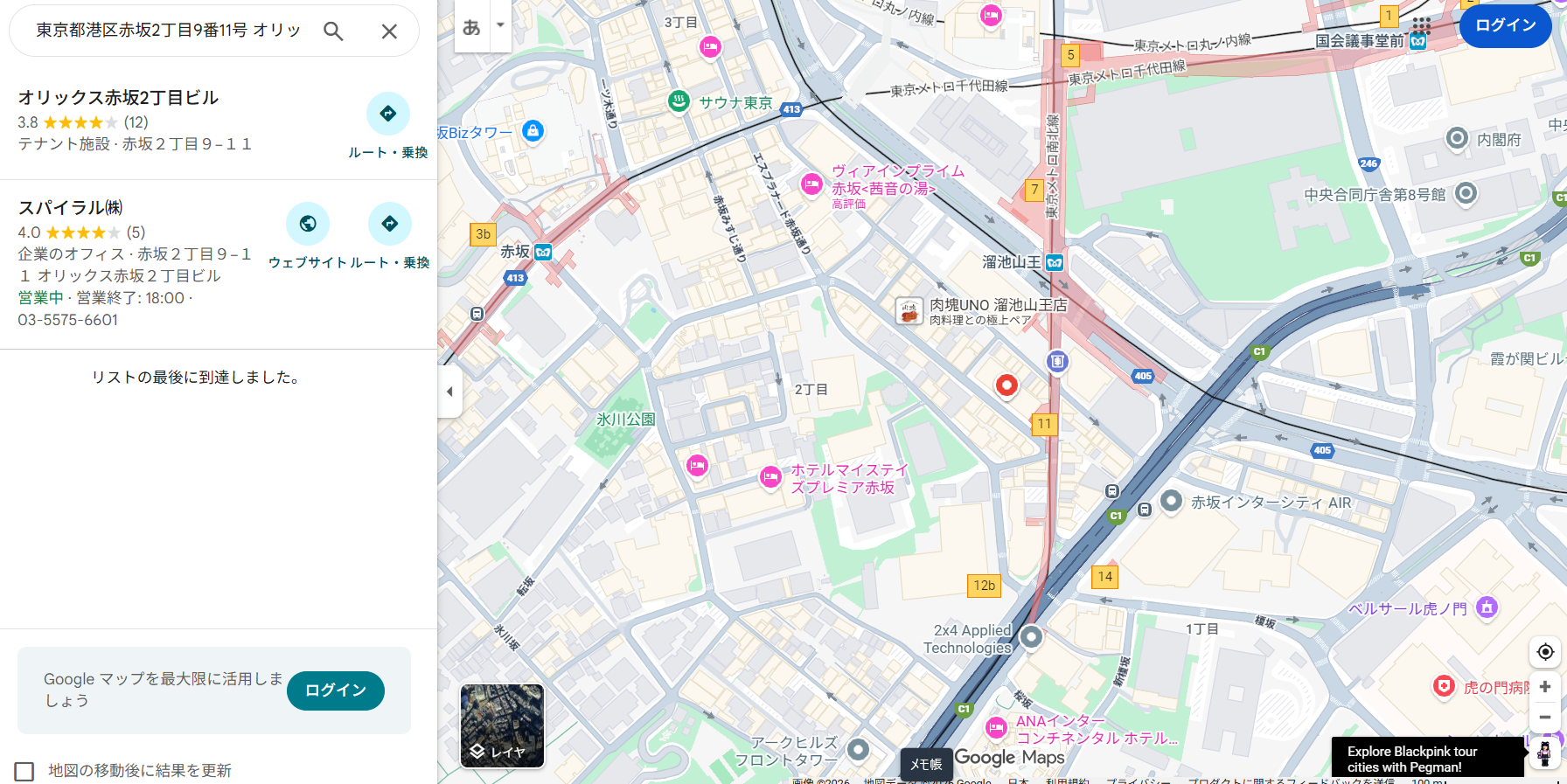
このように、自動的にその住所にピンが立った状態でGoogleマップが開きます!
さらに、Google Maps API を使用していないため、API利用回数に応じた課金対象にはならず実装もお手軽です。
さらに、Google Maps API を使用していないため、API利用回数に応じた課金対象にはならず実装もお手軽です。
おわりに
いかがでしたでしょうか。
API連携開発となるとハードルが高いですが、この方法なら「リンクを作るだけ」なので、
非エンジニアの方でも簡単に実装できます。
ぜひ試してみてください!
API連携開発となるとハードルが高いですが、この方法なら「リンクを作るだけ」なので、
非エンジニアの方でも簡単に実装できます。
ぜひ試してみてください!